Ten Things the AI Price Pages Don't Tell You
Caching, hidden thinking, default effort, tokenizers and benchmarks across OpenAI, Anthropic, Google, xAI and DeepSeek, and what each one does to your bill.
By Nelson, maker of Aurator
Recently I flew from Australia to South America, through the United States. Planes, layovers, more planes. All together it was about fifty hours in the air and in airports.
So I did what I always wanted to have time for. I read the technical side of the newest AI models properly. Not the launch videos, not the headlines. The model docs, the pricing pages, the caching rules, and the benchmark reports, from OpenAI, Anthropic, Google, xAI and the open-weight labs.
I build small apps for the Mac and the iPhone on my own, and I use these models every day. So I read them the way a developer reads them. What does this cost me? What changes when I switch? What is going to catch me out?
Here are ten things I found. Every number comes from the vendor's own documentation or from an independent source, and the links are at the end.
1. Price per token is the wrong number to compare
We all look at the rate card first. Input price, output price. But the rate card does not tell you what a finished task costs, because models use very different amounts of tokens to get there.
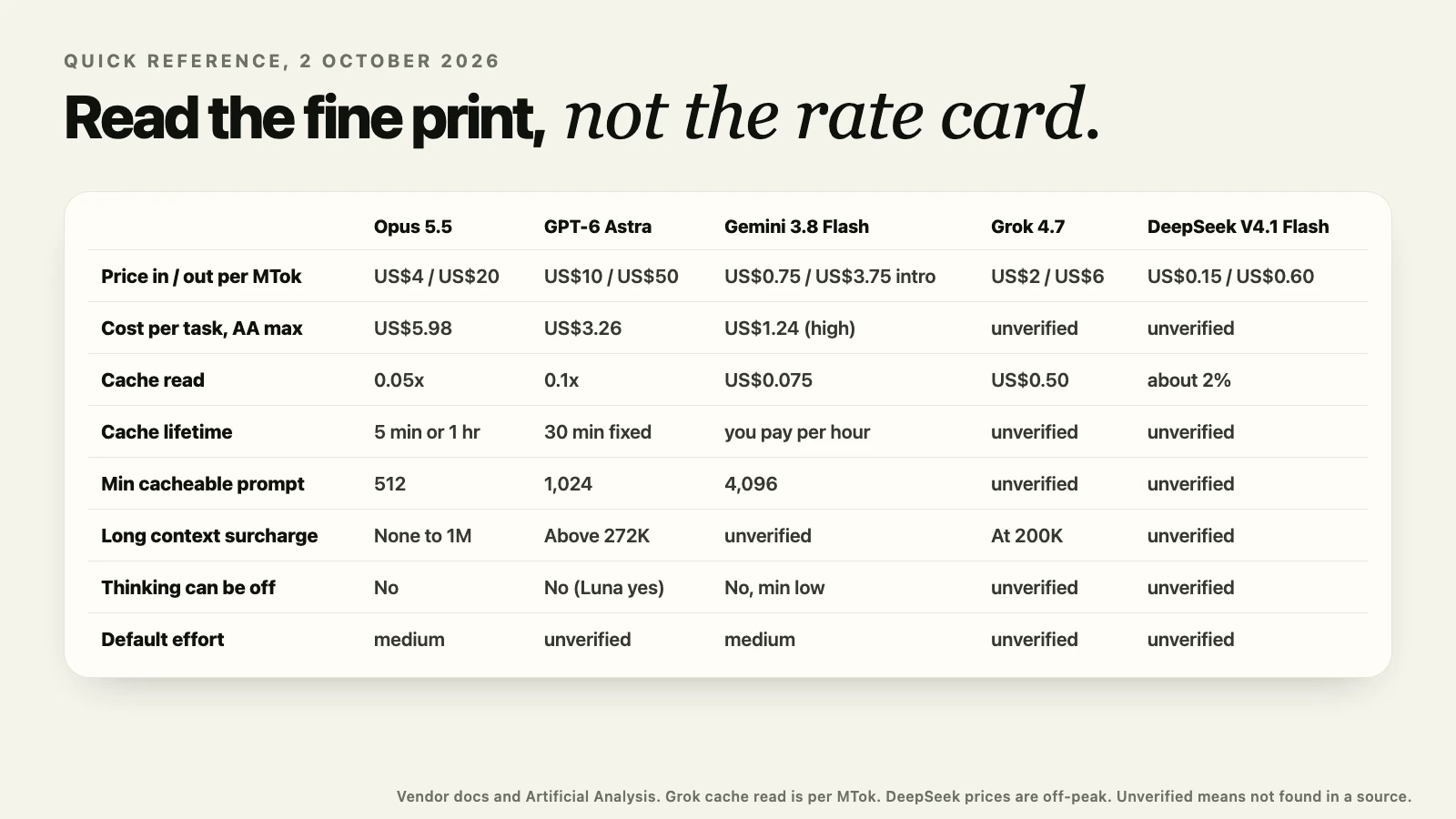
Artificial Analysis runs the same set of tasks on every model and measures the real cost. At maximum effort, Claude Opus 5.5 costs US$4 per million input tokens and US$20 per million output tokens, and it came to US$5.98 per task, using 260 million output tokens across the index. GPT-6 Astra costs US$10 and US$50, more than double, and yet it came to US$3.26 per task, because it used only 60 million output tokens. Sonnet 5.5, the cheapest of the three per token, was the most expensive per task at US$7.62.
So please, measure cost per completed task on your own work. The cheapest model per token can be the most expensive one per job.
2. If your agent pauses, the cache rules matter more than the model
Prompt caching is where the real savings are for agents. But each vendor caches differently, and the difference shows up when your agent waits.
Anthropic caches for five minutes at 1.25 times the input price to write, or for one hour at 2 times. Reading from the cache costs a tenth of the input price on most Claude models, a twentieth on Opus 5.5, and a fortieth on Fable 5.1.
OpenAI, on GPT-5.6 and later, keeps a cache entry for a fixed minimum of thirty minutes, also at 1.25 times to write. Google's Gemini 3.8 Flash charges for cache storage by the hour.
So think about a coding agent that pauses ten minutes between turns while you review its work. On OpenAI the cache is still there. On Anthropic it is gone, unless you paid for the one-hour write. Same agent, same prompts, a very different bill.
3. Short prompts may never be cached at all
This one is small, but it surprised me. Each vendor has a minimum prompt length before caching even starts.
It is 512 tokens on Opus 5.5 and Sonnet 5.5, 1,024 tokens on OpenAI, and 4,096 tokens on Gemini 3.8 Flash. That is an eightfold difference.
So a short system prompt that caches on Claude can quietly miss the cache on Gemini, every single call. If you build small tools with short prompts, like I do, check this before you assume caching is saving you money.
4. Long context has a price cliff almost everywhere
Every flagship model now offers around a million tokens of context. But using all of it is priced very differently.
OpenAI charges more for the whole request once the input goes above 272,000 tokens. On the GPT-6 Astra model page that is twice the input price and one and a half times the output price. Gemini 3.1 Pro moves from US$2 and US$12 to US$4 and US$18 above 200,000 tokens. Grok 4.7 doubles at 200,000.
Anthropic is the exception. Since Claude 4.6, a request of 900,000 tokens is billed at the same rate per token as a request of 9,000.
So if your work really needs long context, like a whole codebase or a long contract, the per-token price on the rate card is only half of the story.
5. On Claude, you pay for thinking you never see
All the flagship models now think before they answer. But they bill and control that thinking differently.
On the Claude 5 models the thinking is hidden by default, and it is still billed in full, as output tokens. You pay for the whole thinking, not the short summary you might see. Opus 5.5 and Fable 5.1 cannot turn thinking off at all, and asking for that returns an error. The lowest setting on Sonnet 5.5 thinks only between tool calls.
On the OpenAI side, GPT-6 Luna still accepts a reasoning setting of none. Gemini 3.8 Flash goes down to low, but not to zero.
So for small, fast tasks, check whether your model can think less, because every hidden thought is on your invoice.
6. The upgrade that quietly lowers your effort
This is the one most likely to catch you out.
Claude Opus 5.5 defaults to medium effort. Every other current Claude model defaults to high. So if you move your code from another Claude model to Opus 5.5 and change only the model name, your requests now run one level lower, without any warning.
Google does something similar. Gemini 3.8 Flash defaults to medium, while Gemini 3.1 Pro defaults to high.
So please, set the effort level explicitly in your code. Do not rely on the default.
7. The test harness moves scores more than the model
I used to read a benchmark score as a property of the model. After this trip, I do not.
GPT-6 Astra scored 62.7% on ARC-AGI-3 with the standard ARC Prize harness, and 99.9% with OpenAI's own harness. ARC Prize verified both runs. Same model, same test, a completely different result, because of the code wrapped around it.
And more effort is not always better either. Opus 5.5 scored 93.3% on ARC-AGI-2 at high effort, and 91.7% at maximum effort. You paid more and got a little less.
So when you read a benchmark, always ask what it ran inside, and at what effort.
8. A million tokens is not the same amount of text everywhere
Comparing prices across vendors has one more trap. The tokenizer.
Anthropic says Claude 4.7 and later produce about 30% more tokens for the same text than earlier models. A million tokens is now roughly 555,000 words, where it used to be about 750,000.
So the same document costs a different number of tokens on each vendor. Before you compare two rate cards side by side, adjust for how many tokens your own text actually becomes.
9. Open models are now within a point of the top
The open-weight models have come a very long way, and the way they are built is different.
DeepSeek V4.1 Flash has 552 billion parameters, but it only activates between 8 and 16 billion of them for each token. It is a mixture-of-experts model, released under the MIT licence. On the independent DeepSWE v1.1 coding benchmark run by Mercor, it scored 71.7%. Opus 5.5 and GPT-6.1 Sol both scored 72.3% on the same run. That is a gap of under one point.
Kimi K3 goes even bigger, with 2.8 trillion parameters and about 104 billion active. On DeepSeek's own API, Flash costs US$0.15 per million input tokens and US$0.60 per million output tokens at off-peak times.
So for a lot of everyday coding work, an open model you can run yourself is now a real option.
10. For short tasks, speed beats raw intelligence
This last one is close to my own work.
For a short rewrite, like cleaning up a dictation, you do not need the smartest model in the world. You need the answer now. Apple's on-device model runs on your Mac, with no network at all. On an M4 Max, one independent benchmark measured about 269 milliseconds to the first token, and about 85 tokens per second after that.
The cloud flagships, with thinking always on, can spend several seconds or much longer before the first word appears. The on-device model has limits. A session holds 4,096 tokens, on macOS 26 and on macOS 27. But for a few sentences, that is plenty.
That is exactly why Aurator, the dictation app I make, does its cleanup on your Mac by default. When you let go of the key, you want your words in front of you, not a loading spinner.
What I am taking home
So here is what I will do differently after these fifty hours.
- Measure cost per finished task, not per token.
- Match the cache to how my agents actually pause.
- Set the effort level in code, every time.
- Read every benchmark with its harness and effort in mind.
- Keep the small, fast work close to the device.
If you build with these models too, I hope this saves you some time and some money. And if you found something different in your own testing, please let me know. I would really like to hear it.
Sources, all checked on 2 October 2026
- Anthropic, models overview, pricing, effort and thinking docs. platform.claude.com/docs/en/models/overview, platform.claude.com/docs/en/about-claude/pricing, platform.claude.com/docs/en/build-with-claude/effort, platform.claude.com/docs/en/build-with-claude/thinking
- OpenAI, pricing, GPT-6 Astra model page and prompt caching guide. developers.openai.com/api/docs/pricing, developers.openai.com/api/docs/models/gpt-6-astra, developers.openai.com/api/docs/guides/prompt-caching
- Google, Gemini API pricing, caching and thinking docs. ai.google.dev/gemini-api/docs/pricing, ai.google.dev/gemini-api/docs/caching, ai.google.dev/gemini-api/docs/thinking
- xAI, models docs. docs.x.ai/docs/models
- Artificial Analysis, model pages for Opus 5.5, GPT-6 Astra and Sonnet 5.5. artificialanalysis.ai/models/claude-opus-5-5, artificialanalysis.ai/models/gpt-6-astra, artificialanalysis.ai/models/claude-sonnet-5-5
- ARC Prize, verified results. arcprize.org/results/openai-gpt-6-astra, arcprize.org/results/anthropic-claude-opus-5-5
- DeepSeek V4.1 Flash on Hugging Face, and DeepSeek API pricing. huggingface.co/deepseek-ai/DeepSeek-V4.1-Flash, api-docs.deepseek.com/quick_start/pricing
- Mercor, DeepSWE v1.1 leaderboard. www.mercor.com/apex/oss-benchmarks/oss-deep-swe-leaderboard
- Kimi K3 on Hugging Face. huggingface.co/moonshotai/Kimi-K3
- Apple, Foundation Models research, and WWDC26 session 241. machinelearning.apple.com/research/apple-foundation-models-2025-updates, developer.apple.com/videos/play/wwdc2026/241
- Apple silicon LLM benchmark. github.com/john-rocky/apple-silicon-llm-bench