What Apple's On-Device Model Can and Cannot Do for Your App
A free, private language model now sits on every recent Mac and iPhone. Here is where it works well, where it stops, and what I learned using it in a real app.
By Nelson, maker of Aurator
Every Mac and iPhone that runs Apple Intelligence now carries a small language model you can call from your own app. It costs you nothing. It runs offline. It does not add a single megabyte to your app. And the data never leaves the device.
For an indie developer, that is a big deal. No API keys, no monthly bill, no privacy policy to rewrite.
I use this model every day. Aurator, the dictation app I make for the Mac, uses it to polish the dictations it keeps in your history, to label them with topics, and to write in your voice. So I have spent a lot of time with it, the good parts and the frustrating parts.
So I want to give you the honest picture, with Apple's own documentation open next to me. What it is, what it can do, what it cannot do, and the limits you only find once you ship.
What it is
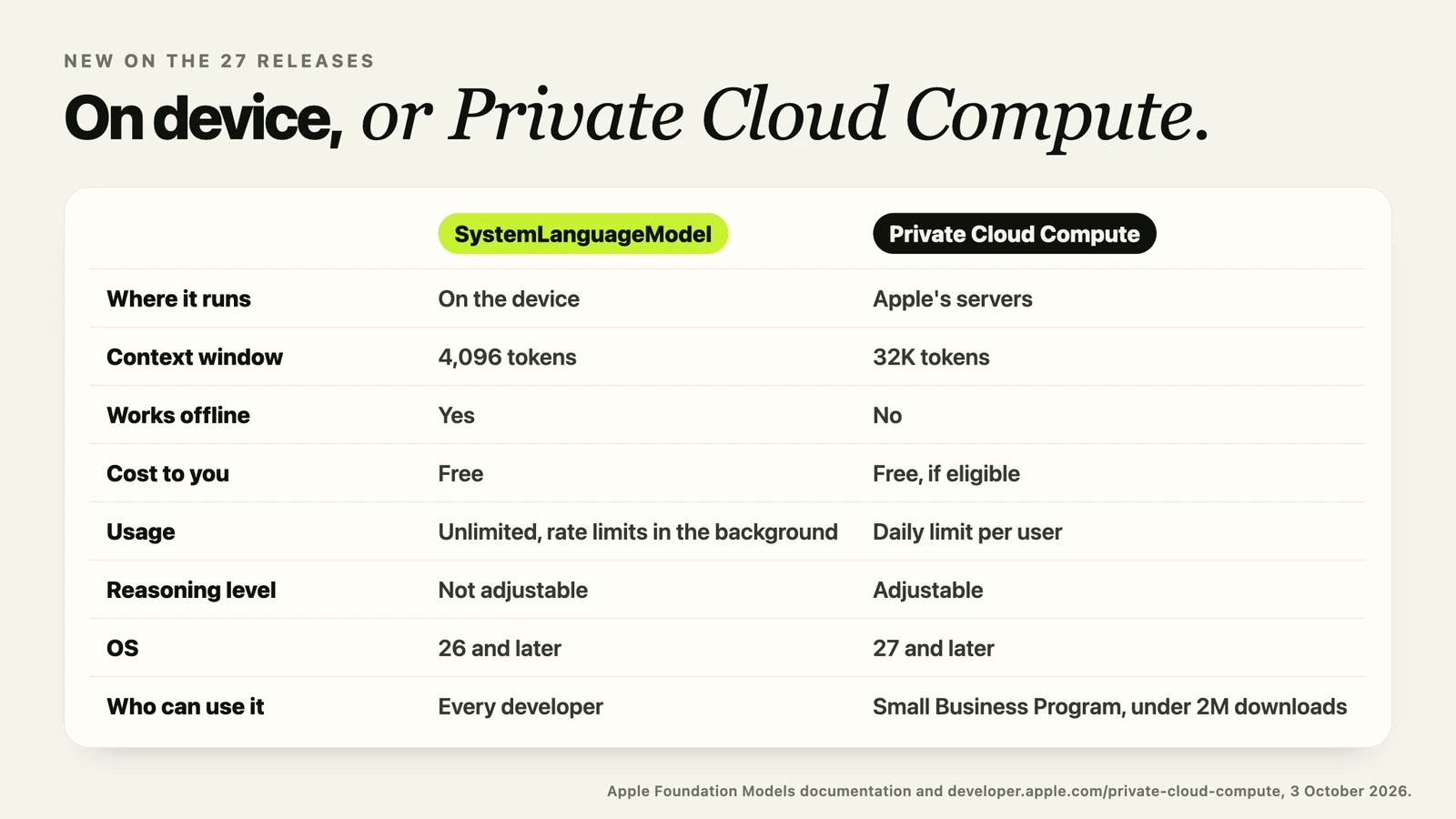
Apple calls it the Foundation Models framework. You get it on iOS, iPadOS, macOS and visionOS 26 and later.
The model itself is small. Apple describes the 2025 version as about three billion parameters, compressed to two bits per weight so it fits on a phone. That is tiny next to the cloud models we use every day. Keep that in mind, because it explains almost everything below.
It only runs where Apple Intelligence runs. That means an iPhone 15 Pro or newer, a Mac or iPad with an M1 or later, and Apple Vision Pro. Apple Intelligence also has to be turned on, supported in the user's region, and set to a supported language.
What it does well
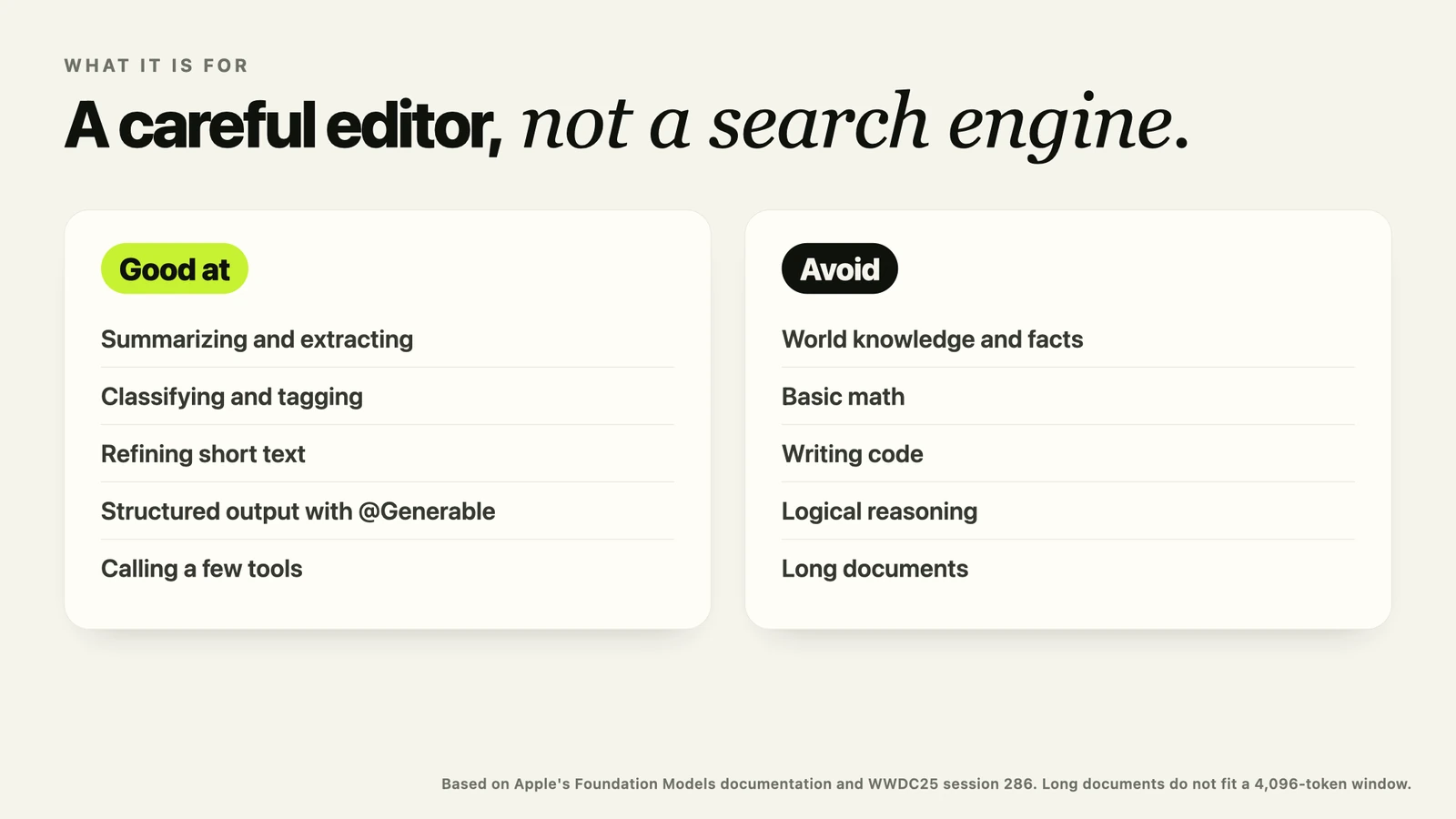
Apple is very clear about where this model fits. It is good at summarization, extraction, classification, refining text, and short creative writing. In practice, that gives you four tools.
- Short text tasks. Clean up a sentence, shorten a paragraph, pull the key points out of a note.
- Structured output. With the Generable and Guide macros you describe a Swift type, and the model fills it in. Apple uses constrained sampling here, so you get a valid value back, not broken JSON you have to repair.
- Tool calling. You give the model a few tools, and it decides when to call them. Apple suggests three to five tools per request at most.
- Content tagging. A special mode that always answers with tags. It is good for sorting notes, photo captions or messages into topics.
What it cannot do
And now the part that matters just as much. Apple says the model "is not designed to be a chatbot for general world knowledge." In the documentation, Apple lists basic math, writing code and logical reasoning as things to avoid.
So please, do not build a general assistant on it. Do not ask it for facts, prices, dates or advice. It will answer, and the answer will sound confident, and it may be wrong.
Think of it as a careful editor that can read what you give it. Not as a search engine, and not as a calculator.
The limits you only find once you ship
1. The window is 4,096 tokens, and everything shares it
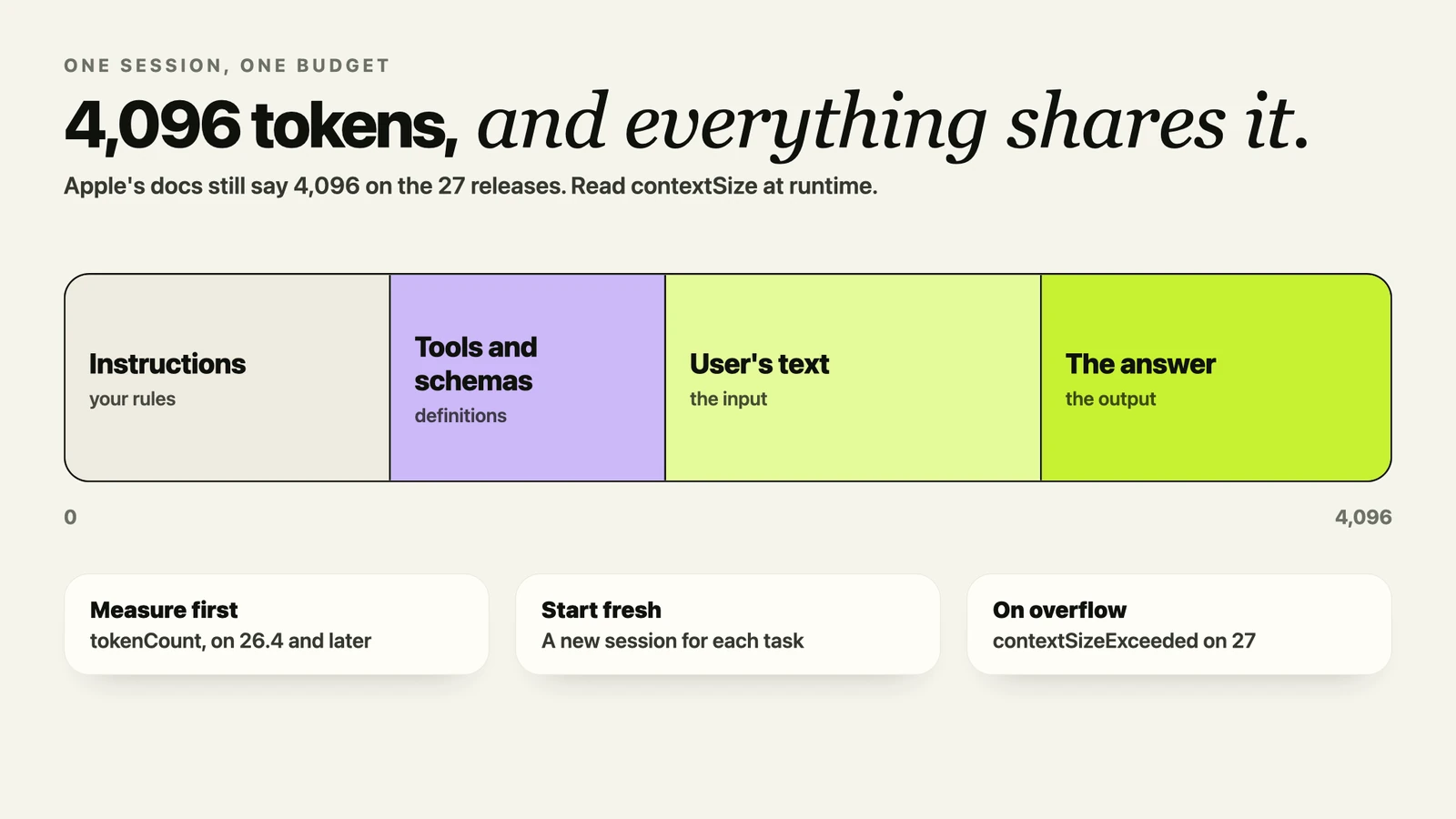
This is the limit you will hit first. One session holds 4,096 tokens in total. Your instructions, the user's text, your tool definitions, your schemas and the model's answer all come out of the same 4,096.
You may have seen 8,192 tokens mentioned for iOS 27 and macOS 27. I repeated that number myself. But Apple's documentation still says 4,096, and in a WWDC26 lab an Apple engineer said the size is the same as before. The 8,192 only appears as a comment in one code sample.
So do not hard-code it. Read contextSize at runtime, and on 26.4 and later use tokenCount to measure your prompt before you send it.
2. The model may simply not be there
Before every call, check SystemLanguageModel.default.availability. It can tell you the device is not eligible, Apple Intelligence is turned off, or the model is still downloading. Each one needs a different message for your user. And your app needs to still work when the answer is no.
3. Guardrails check both directions
Apple checks the user's input and the model's output. If something trips them, you get a guardrail violation or a refusal instead of an answer. Apple reduced the false positives in 26.4, and says iOS 27 improves them again.
If your app transforms the user's own text, there is a more permissive mode, permissiveContentTransformations. But it only works when you ask for a plain string, not for structured output.
4. One request at a time, and fewer in the background
A session handles one request at a time. Check isResponding before you send the next one. In the foreground there is no rate limit on the local model. In the background there can be, and Apple does not publish the numbers.
5. The model changes with the OS
The model ships inside the operating system, and Apple has already shipped three versions of it. A prompt that worked perfectly on one version can behave differently on the next. So after every major OS update, run your prompts again and compare the results.
6. The error names changed in 27
On the 26 releases, a full window throws exceededContextWindowSize. On 27 that is deprecated, and you get LanguageModelError.contextSizeExceeded instead. Guardrails and refusals moved to the same new type. When you move your project to the 27 SDK, map the new errors to the same outcomes as the old ones.
And if you trained a custom adapter, Apple says the adapter toolkit 26.0.0 is the last release, and it is not compatible with the 27 releases.
What I learned using it in Aurator
When a dictation still has fillers or repeated words, Aurator sends it to this model on your Mac and gets back a cleaner copy for your history. Here is what made that work reliably.
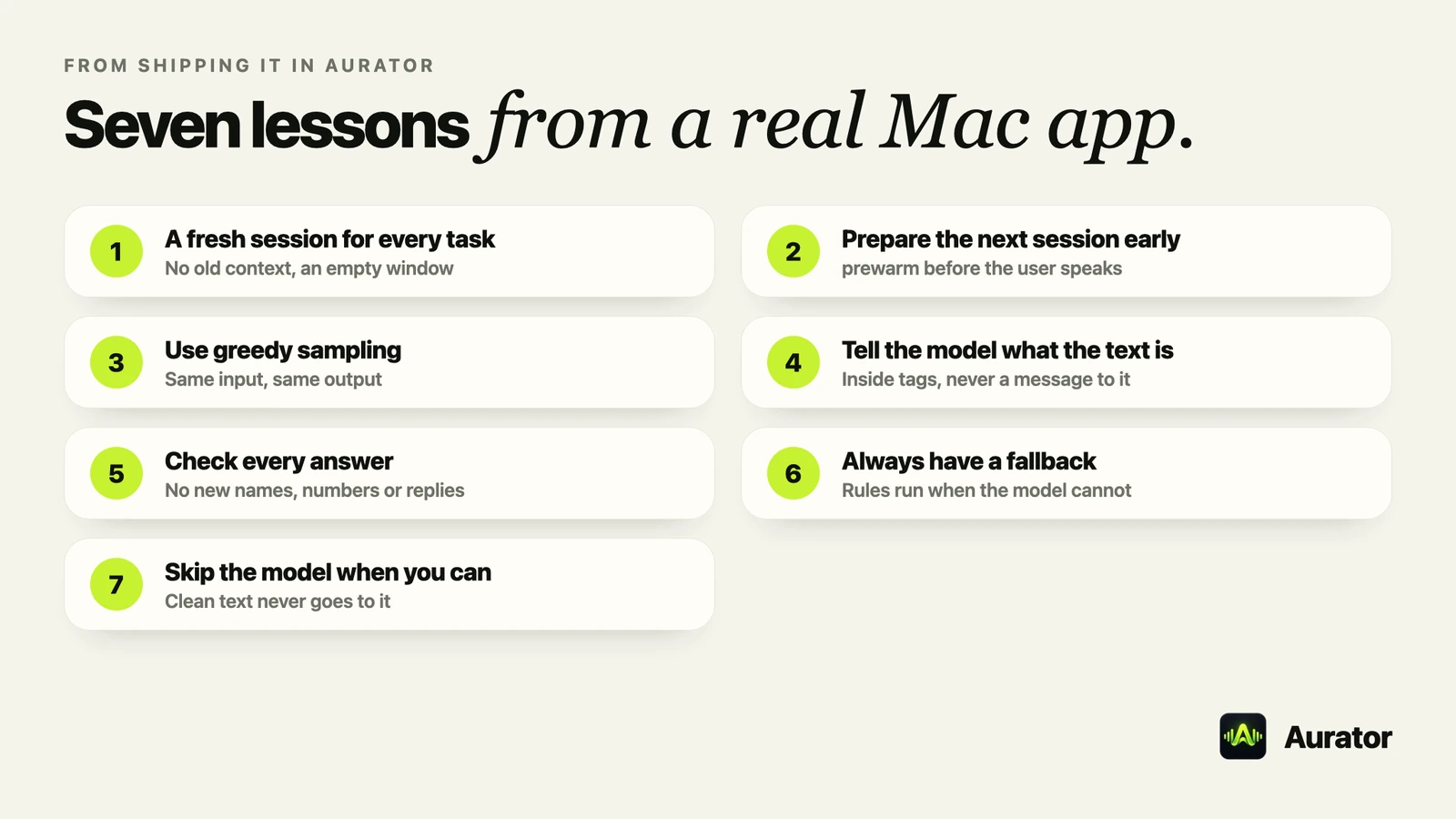
- A fresh session for every task. Every dictation gets a new session, so one dictation never becomes context for the next. It also keeps the window empty for the work in front of you.
- Prepare the next session early. As soon as one dictation finishes, Aurator creates the next session and calls prewarm. So when you speak again, the instructions are already loaded.
- Use greedy sampling. For cleanup you want the same input to give the same output. Greedy sampling does that.
- Tell the model what the text is. The dictation goes inside tags, and the instructions say it is the speaker's own words to someone else, never a message to the model. Without that, the model sometimes answers a dictated question instead of cleaning it.
- Check every answer before you use it. Aurator rejects an answer that adds a name or a number, rewrites too much, or replies to the text. Then it uses the next option.
- Always have a fallback. When the model is unavailable, fails, or gives an answer that does not pass the check, Aurator keeps the text its own rules already tidied. The user always gets clean text.
- Skip the model when you can. Many dictations are already clean. Those never go to the model at all, which makes them faster.
And for longer pieces, like Write for me, Aurator budgets the window by hand. It estimates about three characters per token, which is cautious, and keeps room for the answer. If the answer still runs past the window, it tries once more with shorter instructions.
How fast it is
Apple has not published its own speed numbers. One independent benchmark, on an M4 Max with macOS 26.0, measured about 265 milliseconds to the first token and about 84 tokens per second. The author estimated the token counts, because the framework did not expose a tokenizer at the time, so treat those numbers as a guide.
At that speed, a cleanup of two or three sentences takes about a second, with no network at all.
What changed in 27
The biggest change is Private Cloud Compute. On the 27 releases, eligible developers can send a request to Apple's servers through the same framework. You get a 32K window and adjustable reasoning, with a daily limit per user.
To use it, your app needs to be in the App Store Small Business Program, have fewer than two million first-time downloads, and hold the entitlement. For many of us indie developers, that is exactly who it is for.
The 27 releases also add image input, usage reporting, new built-in tools for text recognition and barcodes, and a LanguageModel protocol so the same code can work with other models. Apple is also opening the framework's source.
So, should you use it?
Here is how I decide.
Use the on-device model when the task is short, the text is the user's own, privacy matters, and a fallback is acceptable. Cleanup, tagging, extraction, short rewrites, filling in a form from a note.
Use Private Cloud Compute or a cloud model when you need world knowledge, reasoning, code, math, or more than a few thousand tokens.
And whichever you choose, design for the day the model is not there.
If you want to see what this model can do inside a real Mac app, Aurator is at tryaurator.app. Seven days free, then US$29 once, and the cleanup runs on your Mac by default.
And if you are building with Foundation Models too, please let me know what you have found. I would really like to hear what worked for you, and what did not.
Sources, all checked on 3 October 2026
- Apple, Foundation Models documentation, including managing the context window, generating content, safety, supporting languages, and Private Cloud Compute. developer.apple.com/documentation/foundationmodels
- Apple, Foundation Models updates. developer.apple.com/documentation/updates/foundationmodels
- Apple, Private Cloud Compute for developers. developer.apple.com/private-cloud-compute
- Apple, Foundation Models adapter training toolkit. developer.apple.com/apple-intelligence/foundation-models-adapter
- Apple, Apple Intelligence devices and languages. support.apple.com/en-us/121115
- WWDC25 session 286, Meet the Foundation Models framework. developer.apple.com/videos/play/wwdc2025/286
- WWDC26 session 241, and WWDC26 lab 8121. developer.apple.com/videos/play/wwdc2026/241, developer.apple.com/videos/play/wwdc2026/8121
- Apple Machine Learning Research, Apple Foundation Models 2025 updates. machinelearning.apple.com/research/apple-foundation-models-2025-updates
- Apple Foundation Models tech report, 2025. arxiv.org/html/2507.13575v2
- Apple silicon LLM benchmark, raw results. github.com/john-rocky/apple-silicon-llm-bench